The Windows 11 installation that was eating my disk space
• 6 min read
I recently noticed that the free space on my Windows drive kept shrinking. Windows itself seemed to be taking up a fair bit of space, so I looked into trying to get it to clean itself up.
Microsoft has a page titled ‘Clean Up the WinSxS Folder’ that goes through a few methods of cleaning up redundant system files.
It first mentions a StartComponentCleanup task that resides in the
Microsoft\Windows\Servicing folder in Task Scheduler. But it turns out that
task was failing with error code 0x800706BE on my machine:
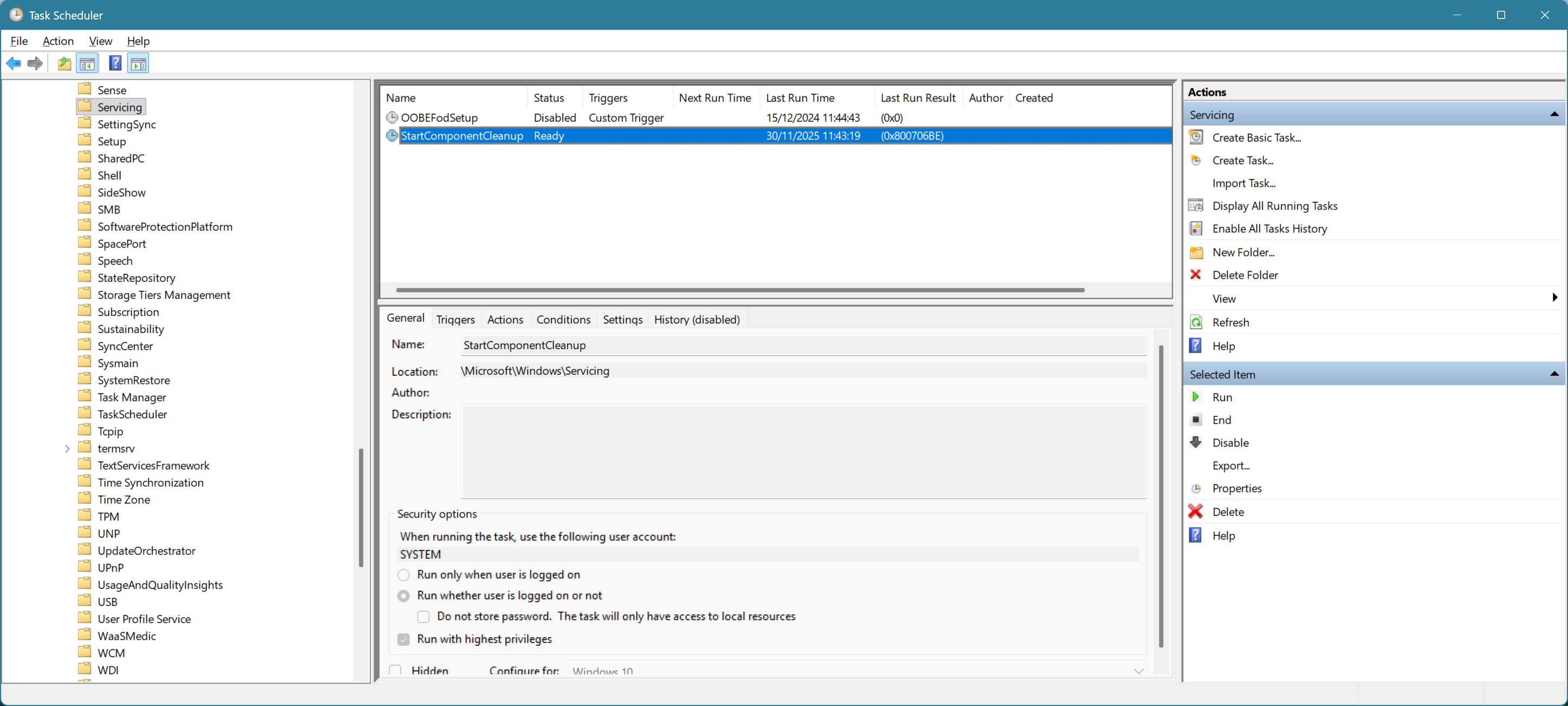
That code is RPC_S_CALL_FAILED (‘The remote procedure call failed’).
I tried manually starting a clean-up using the suggested
Dism.exe /online /Cleanup-Image /StartComponentCleanup command:
Deployment Image Servicing and Management tool
Version: 10.0.26100.5074

Image Version: 10.0.26200.7309

[== 5.0% ] Error: 1726

The remote procedure call failed.

The DISM log file can be found at C:\WINDOWS\Logs\DISM\dism.log
It quickly failed with the same error, and the same thing happened when
/ResetBase was added to the command.
The command output mentioned a dism.log log file, so I had a look at that. The
last few lines of it were:
2025-12-04 21:29:44, Info                  DISM   DISM Package Manager: PID=45648 TID=38232 Processing the top level command token(cleanup-image). - CPackageManagerCLIHandler::Private_ValidateCmdLine
2025-12-04 21:29:44, Info                  DISM   DISM Package Manager: PID=45648 TID=38232 Attempting to route to appropriate command handler. - CPackageManagerCLIHandler::ExecuteCmdLine
2025-12-04 21:29:44, Info                  DISM   DISM Package Manager: PID=45648 TID=38232 Routing the command... - CPackageManagerCLIHandler::ExecuteCmdLine
2025-12-04 21:29:44, Info                  DISM   DISM Package Manager: PID=45648 TID=38232 CBS session options=0x400100! - CDISMPackageManager::Internal_Finalize
2025-12-04 21:29:59, Error                 DISM   DISM Package Manager: PID=45648 TID=38232 Failed finalizing changes. - CDISMPackageManager::Internal_Finalize(hr:0x800706be)
2025-12-04 21:29:59, Error                 DISM   DISM Package Manager: PID=45648 TID=38232 Failed processing package changes - CDISMPackageManager::StartComponentCleanupEx(hr:0x800706be)
2025-12-04 21:29:59, Error                 DISM   DISM Package Manager: PID=45648 TID=38232 Failed to start component cleanup. - CPackageManagerCLIHandler::ProcessCmdLine_CleanupImage(hr:0x800706be)
2025-12-04 21:29:59, Error                 DISM   DISM Package Manager: PID=45648 TID=38232 Failed while processing command cleanup-image. - CPackageManagerCLIHandler::ExecuteCmdLine(hr:0x800706be)
2025-12-04 21:29:59, Info                  DISM   DISM Package Manager: PID=45648 TID=38232 Further logs for online package and feature related operations can be found at %WINDIR%\logs\CBS\cbs.log - CPackageManagerCLIHandler::ExecuteCmdLine
2025-12-04 21:29:59, Error                 DISM   DISM.EXE: DISM Package Manager processed the command line but failed. HRESULT=800706BE
2025-12-04 21:29:59, Info                  DISM   DISM Package Manager: PID=45648 TID=44336 Finalizing CBS core. - CDISMPackageManager::Finalize
2025-12-04 21:29:59, Info                  DISM   DISM Manager: PID=18892 TID=15064 Closing session event handle 0x270 - CDISMManager::CleanupImageSessionEntry
2025-12-04 21:29:59, Info                  DISM   DISM.EXE: Image session has been closed. Reboot required=no.
2025-12-04 21:29:59, Info                  DISM   DISM.EXE:
2025-12-04 21:29:59, Info                  DISM   DISM.EXE: <----- Ending Dism.exe session ----->
2025-12-04 21:29:59, Info                  DISM   DISM.EXE:
That doesn’t really say what the problem is. It does mention another log file,
%WINDIR%\Logs\CBS\CBS.log, though. The last few lines of that were:
2025-12-04 21:29:56, Info                  CBS    Delta Format: ForwardOnly
2025-12-04 21:29:56, Info                  CBS    Appl:LCU package and revision compare set to explicit
2025-12-04 21:29:56, Info                  CBS    Package Format: PSFX
2025-12-04 21:29:56, Info                  CBS    Delta Format: ForwardOnly
2025-12-04 21:29:56, Info                  CBS    Appl:LCU package and revision compare set to explicit
2025-12-04 21:29:56, Info                  CBS    Package Format: PSFX
2025-12-04 21:29:56, Info                  CBS    Delta Format: ForwardOnly
2025-12-04 21:29:57, Info                  CBS    Appl:LCU package and revision compare set to explicit
2025-12-04 21:29:57, Info                  CBS    Package Format: PSFX
2025-12-04 21:29:57, Info                  CBS    Delta Format: ForwardOnly
2025-12-04 21:29:57, Info                  CBS    FOD is owned by orphaned LCU. FOD package: Microsoft-Windows-Licenses-Professional-Package~31bf3856ad364e35~amd64~en-US~10.0.26100.1, LCU owner: Microsoft-Windows-Client-LanguagePack-Package~31bf3856ad364e35~amd64~en-US~10.0.26100.1
2025-12-04 21:29:59, Info                  CBS    Failed to FinalizeEx using worker session [HRESULT = 0x800706be]
That doesn’t make it clear what the actual reason for failure is either, but the
second last line seems to be complaining about the
Microsoft-Windows-Client-LanguagePack-Package~31bf3856ad364e35~amd64~en-US~10.0.26100.1
package being orphaned.
It’s worth noting is that, apart from disk space being eaten, there were few signs that anything was wrong. Windows updates were installing without error (albeit a bit slowly), and the system was working fine.
To try and get the component clean-up working, I tried various other commands,
including SFC /SCANNOW and Dism.exe /Cleanup-Image /RestoreHealth. Nothing
identified a problem or got rid of the error.
I then tried using Dism /Online /Add-Package and
Dism /Online /Remove-Package to add and remove the
Microsoft-Windows-Client-LanguagePack-Package~31bf3856ad364e35~amd64~en-US~10.0.26100.1
package. The /Add-Package command required finding a copy of the package,
which I found in the
Languages and Optional Features ISO.
Still, the component clean-up command failed with the same error. (I did try
asking it to remove the
Microsoft-Windows-Licenses-Professional-Package~31bf3856ad364e35~amd64~en-US~10.0.26100.1
package too, but it would refuse to, saying it can only be removed by the
package owner.)
Another command I came across that was of interest was
Dism.exe /Online /Cleanup-Image /AnalyzeComponentStore.
It provides some statistics about the WinSxS folder. This is what it output on
my machine:
Deployment Image Servicing and Management tool Version: 10.0.26100.5074

Image Version: 10.0.26200.7309

[==========================100.0%==========================]

Component Store (WinSxS) information:

Windows Explorer Reported Size of Component Store : 87.11 GB

Actual Size of Component Store : 66.92 GB

  Shared with Windows : 9.04 GB
  Backups and Disabled Features : 57.79 GB
  Cache and Temporary Data : 90.55 MB

Date of Last Cleanup : 2024-09-10 05:57:26

Number of Reclaimable Packages : 94 Component Store Cleanup Recommended : Yes

The operation completed successfully.
Seemingly, the component clean-up has not run successfully since Windows 11 24H2 was installed. And the amount of disk space being wasted was approaching 60GB.
I looked for third-party tools that might be able to help with the problem. I found nothing that was free, maintained and trustworthy-looking. So I switched tack and thought an in-place upgrade of the same Windows version would be the safest and easiest thing to do.
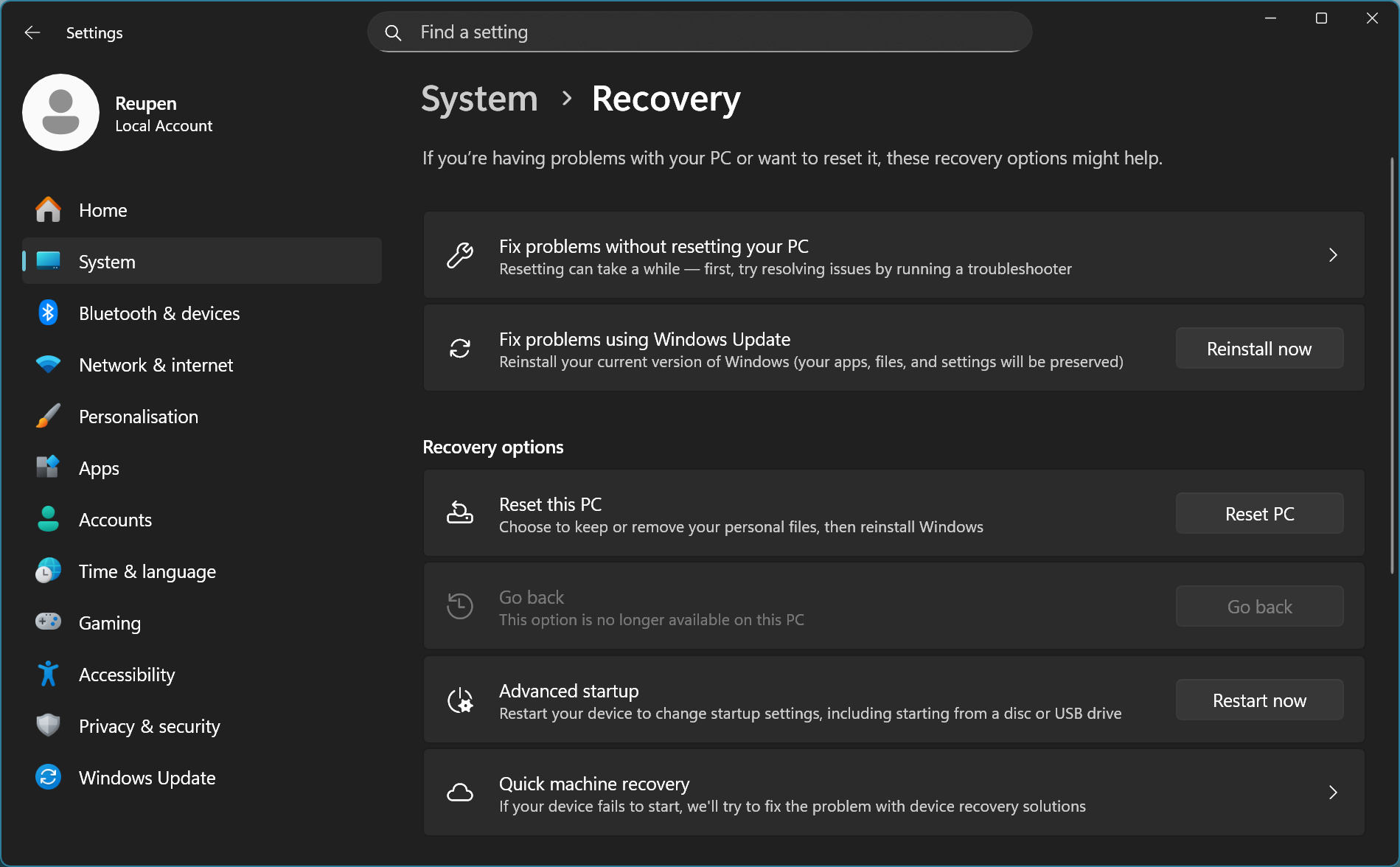
I was going to do this by downloading and using the Windows 11 25H2 ISO from Microsoft. But it turns out that you can do it via the Settings app, via the ’Reinstall now’ button next to ‘Fix problems using Windows Update’, on the System > Recovery page:
That triggered an in-place reinstallation via Windows Update:

That got stuck at 97% for a while, but it eventually got past that, and a couple of reboots later, the process was finished.
Running Dism.exe /Online /Cleanup-Image /AnalyzeComponentStore at this point
yielded:
Deployment Image Servicing and Management tool Version: 10.0.26100.5074

Image Version: 10.0.26200.7309

[==========================100.0%==========================]

Component Store (WinSxS) information:

Windows Explorer Reported Size of Component Store : 16.25 GB

Actual Size of Component Store : 15.90 GB

    Shared with Windows : 8.42 GB
    Backups and Disabled Features : 7.48 GB
    Cache and Temporary Data : 1.44 MB

Date of Last Cleanup : 2024-04-01 18:06:23

Number of Reclaimable Packages : 3 Component Store Cleanup Recommended : Yes

The operation completed successfully.
The component store was down from 67GB to 16GB, already a significant improvement. (Interestingly, the timestamp given for ‘Date of Last Cleanup’ has gone backwards…)
The free space situation on my drive had not yet improved, however. That
required running the Disk clean-up tool to get rid of the Windows.old
directory (created by the in-place upgrade process) and to clean up a few other
things. I also ran the Dism.exe clean-up commands (which were now working!).
After doing that, WinSxS was down to under 12GB:
Deployment Image Servicing and Management tool Version: 10.0.26100.5074

Image Version: 10.0.26200.7309

[==========================100.0%==========================]

Component Store (WinSxS) information:

Windows Explorer Reported Size of Component Store : 11.66 GB

Actual Size of Component Store : 11.55 GB

    Shared with Windows : 8.43 GB
    Backups and Disabled Features : 3.11 GB
    Cache and Temporary Data :  0 bytes

Date of Last Cleanup : 2025-12-05 16:17:41

Number of Reclaimable Packages : 2 Component Store Cleanup Recommended : Yes

The operation completed successfully.
Problem solved, it seems. (In actuality, I’ve gained around 65GB in free space, so there was probably some other junk deleted too.)
It’s unfortunate, though, that Windows wasn’t able to detect and sort out this problem itself. (And not to mention that this happened in the first place.)
Buy me a coffee